Alignment Procedure
Accurate alignment results from successful execution of three key steps: (1) Calibration, (2) Train Time, and (3) Run Time. Calibration and Train Time tasks are only executed during setup, while the run time tasks are executed during production operation. The purpose of calibration is to establish shared coordinates among different cameras, and motion devices. Calibration only needs to be performed once if the machine physical setup is held constant (as long as there is no hardware change such as camera position change, lens change, or station's height change which leads to calibration data becoming invalidated). Train time tasks are executed to teach the target position(golden pose) of part relative to the motion device, it's also only required once as long as there is no change on calibration data or trained golden pose. Run time tasks are executed every time when vision system needs to guide motion for completing the alignment task.
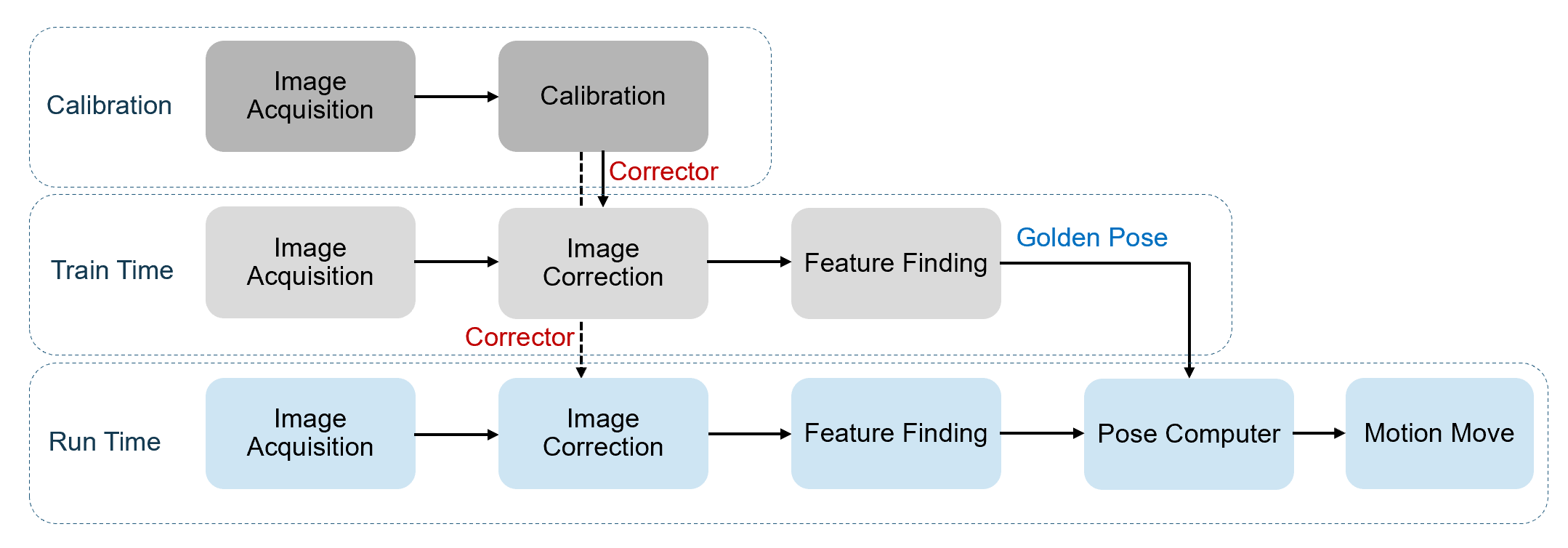
Calibration
The shared coordinates among different cameras, and motion devices are established mainly through hand-eye calibration.
Before hand-eye calibration, a calibration target such as checkerboard plate or run time part with fiducial marks is placed on platform. During calibration, either the movable platform moves and rotates the calibration target or cameras move and rotate to a set of predefined poses. At each step of this process, the vision system acquires images and accumulate features of the calibration target. At the end of the calibration, the vision system runs hand-eye calibrator to calculate the transforms among different cameras and motion devices, and establishes a shared coordinate space called Home2D.
This transform between Home2D and raw image coordinate spaces for each camera is then stored within a structure called Corrector though which any raw image in train time or run time captured by the same camera can be converted into corrected image with Home2D coordinate space attached. With the corrected images, the vision system can find features and output their locations in Home2D space directly which then will be used for computing how much motion device should move to complete alignment.
Train Time
The purpose of train time is to set up target pose(golden pose) for run time part. Golden pose is consisted of a list of features and their coordinates in Home2D. The steps are:
- Manually move a part to the ideal pose with respect to motion device
- Acquire image(s) of the part
- Use Correctors generated in calibration process to convert raw images into corrected images
- Configure vision task to find the features on that part
- Send command to train golden pose. This golden pose will be saved within the vision system.
Run Time
The steps of run time are:
- Load a run time part on platform
- Acquire image(s) of the part
- Using Correctors generated from calibration process to transform raw images to corrected images
- Run vision tasks to find features on that part
- Calculate the pose differences between golden pose and current pose
- Motion move to an absolute pose (x, y, Ө) or a relative pose from trained pose(dx, dy, dӨ) provided by vision to bring part to golden pose.
The first three steps of run time process are the same as the steps during the train time process. The differences lie in Step 4-6: In Step 4, there is no need to setup vision task again as it has already been configured in train time and saved in alignment recipe. Step 5: there is no need to change trained golden pose. Instead, that step only uses the trained golden pose to calculate its differences with current run time pose. Step 6: motion device will actually move part to align it to trained golden pose.
There are two types of part handling in Step 6.